
Algorithms, Pseduocodes and FlowCharts.

Some Basic Knowledge.
C++ is a general purpose programming language, created by Bjarne Stroustrup and was firstly released in 1985. It is an extension to C language, Reason for that is if you are familiar with C language than you must be familiar with the fact that there are no classes, templates etc. present in C language. Due to which when classes are added to C language it is named as "C with Classes", but C++ is considered as default name now. 

Extra thing to remember - In "C++" the symbol "++" after C is post increment symbol and therefore, "C++" means that In C additional features are added.

Now, let's define, what are algorithms?

Algorithms are nothing but set of rules that must be followed to accomplish some task.
(Now, What that mean?😕)
let's take an example of swapping two numbers, i.e. if a = 10 and b = 20 after swapping a = 20 and b = 10.
How will you write the procedure for this?  (There are many such algorithms).
According to me following steps will be sufficient for swapping algorithm.

start:
	Take two numbers say "a" and "b"
	take an another variable say "temp"
	store a in temp
	make a equal to b
	make b equal to temp
end

Now, you must be thinking what is this, this is not looking a c++ program or any of other languages program(excluding English). Yes, this is not a pure program but this is a perfect perfect algorithm and when we write our algorithm  in this form or in a form when we don't wanted to use some particular programming language but we just wanted to present our algorithm with as much clarity as possible, we use PSEUDOCODES. I were emphasizing on this because it will help you alot in future times.

Now, let's define one more strategy for representing our Algorithms with clarity.
The name of the topic is Flow Charts.

FlowChart is a diagrammatic representation of sequence of logical steps that we require to perform the task.
Below is the flowchart for finding average of two numbers.
If you want to read more about flowcharts click here.
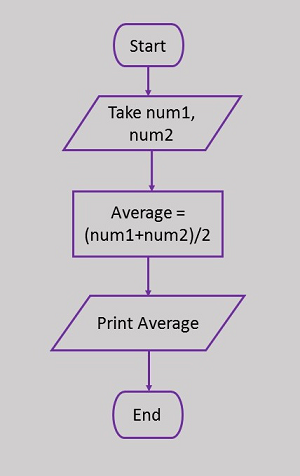
Finding average of two numbers.
Image source - tutorialspoint


In Next slide we will discuss about How C++ program is created, compiled and executed.

Stay tuned for the upcoming content. For any query leave a comment below.

Click the Subscribe button at the top to follow my every post regarding c++.

References -
  • w3school.

Comments

Post a Comment

Popular posts from this blog

C-style strings vs String Class.

Here, we are going to learn about, what are C-Style Strings and what is String class . So, let's start by giving you the introduction. C-Style String is nothing but, an array of characters, and from the term array we can surely assume that these are static in size i.e. the size of these C-Style strings cannot be increased or decreased. String Class is a Built-in class that provide us much more functionality than C-Style String. C-STYLE STRINGS Before learning the String class, which is full-fledged feature of C++, we should rather start by taking a look at some important things about C-Style String. C-Style Strings are actually array of characters that are terminated by a null character "\0". If you are confused with, why null character? The reason is that, It helps us to define, upto which index we have some useful data present in our character array, and after null character there may or may not be some garbage values of characters. Let's first start by showing a...

Creating and executing c++ program.

In this slide we will discuss the following things. Creating an C++ file. Writing a Program and learning every aspect of its execution like. compilation, assembling and linking of library functions. Creating C++ File You should skip to " Your First Code ", if you know how to do this .😉 C++ program is nothing but a file with extension ".cpp". Creating a C++ file is not difficult. You can create it in anyway you like, I gave a simple way for creating. (Note - If you have not installed c++ compiler in your computer. Then, to run the c++ files, you must install  the compiler first or you can use some online c++ compiler like onlinegdb ) Your First Code Now, start typing the following code in your ".cpp" that you created. (This is also called as source code and you can consider it as the basic template for your c++ program, but I will progressively introduce more things that you can add to your c++ program). 1 2 3 4 5 6 #include<iostream> int main () ...

Pointers.

I have already introduced pointers in the C++ Derived Data Types post , But, here I will be showing some practical examples and at the end of this slide, you will be understanding pointers like they are, obvious to you. So, let' start by reminding you the basic syntax :- <data type> *<name_of_pointer> ; Below is the simple program for pointer declaration and initialization. #include<iostream> using namespace std; int main (){ int a = 20 ; int *b; // Declaration of pointer b b = &a; // Initialization of pointer b (& is used to extract the address of a) int *c = b; // Initialization of pointer c to pointer b cout << a << endl << b << endl << c << endl; } Okay, after reminding the basic syntax of pointers, you have to memorize the reason why we generally use pointers, I have already discussed that also, but, let me briefly describe it. One of the memory section in our Comp...